The best and most correct option for such TVs is an IPTV set-top box on Android!!! Everything else is a crutch!!!
-
Our player TeamPlay is installed via MSX according to the instructions, while the player is in beta version, it works as is, may stop working at some point, so check the players below;
-
Player OTT-play FOSS for TVs LG, Samsung and others not on Android
https://ottp.eu.org/www/install/ (player installation, three methods)
Configure the player according to instructions 5.5 Setting up the ott-play player.. -
media player Kodi setup instructions 5.7 Kodi media player setup
-
Player Smart IPTV (SIPTV)
Attention, the player is paid, you can test the player for free for 7 days!
Install the player on your TV
LG
Samsung
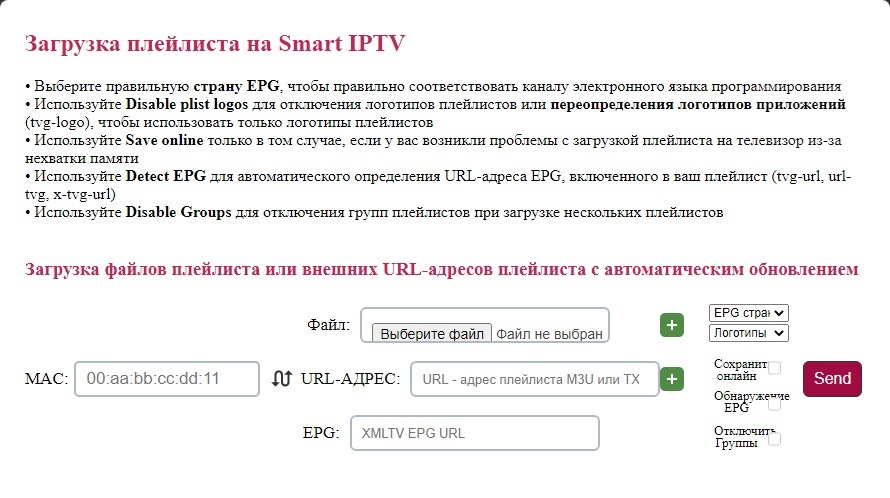
Load the playlist into the player https://siptv.app/mylist/index.html
a) Enter the MAC address of your TV in the MAC field;
b) The "snake" icon to the right of the MAC field changes the playlist loading method: either you download the playlist and specify (select) the path to it, or specify the playlist URL and the device pulls the required playlist from our server; the playlist link can be found in your personal account under Playlists -> Links, select the SmartIPTV playlist and press the Copy button. The playlist link for this player looks like https://tv.team/pl/13/*******/playlist.m3u8 (replace stars with your unique access code (token)); we recommend the second method of playlist loading because if the channel list changes you will not need to download the playlist again;
c) Enter the EPG link http://epg.team/tvteam.xml in the EPG field
Restart the player and watch TV.
You do not have to specify the EPG country; if you want to specify, for Russia you can choose ExUSSR.
-
Player ott-play by Alex (not for Russia and Belarus), WARNING!!! The ott-play by Alex player blocks Russian channels and servers, if you need these channels, use the OTT-play FOSS player (above).
LG
Samsung
Toshiba, Panasonic, Sony, Philips, Hisense, Skyworth, TCL, Sharp, Haier...
Configure the player according to instructions 5.5 Setting up the ott-play player. -
Player M3U IPTV (only for Samsung Tizen and LG WebOS)
https://m3u-ip.tv/
To set up the M3U IPTV player, use the playlist for Televizo.
It seems the archive on the M3U IPTV player works only on the Premium version of the player, cost 1400 rubles.
ATTENTION! Due to the update of the donor application RedBull, on many Samsung TVs the ott-play (FOSS and DRM) player stopped loading, installed using this method. For this reason, it is better to install these players on Samsung TVs via widget (a computer/laptop is required). Download the archive of any player on your computer, unpack it, run the application (file with exe extension) and follow the on-screen instructions:
https://forum.tv.team/files/SAMSUNG.TV/FOSSInstallTizen_byFoxTV.zip
https://forum.tv.team/files/DRM-play/DrmPlayInstallTizen.zip
Additions and clarifications to the instructions:
- you can find more detailed info on how to enter the developer menu on the internet using search;
- the computer and TV must be in the same local network, i.e., connected to the internet by the same method – either both by cable or both by Wi-Fi;
- press buttons in the following order 1-OK-2-OK-3-OK-4-OK-5-OK, i.e., after selecting a numeric button, you need to press OK, and the buttons must be pressed quickly without pauses.