!!!! First of all!!!! set the number of devices back to 2.
Secondly, keep in mind that if you take a test using a VPN from one country, but start watching from an IP address of another country, the test will be disconnected.
And thirdly, a free test is not issued manually; if the system does not allow you to take the test automatically, it means you have previously used our service, for example, under a different login; even if the system is mistaken, I repeat - a free test is not issued manually, do not try to prove anything to us.
The process of obtaining a test is actually short and comes down to completing two steps:
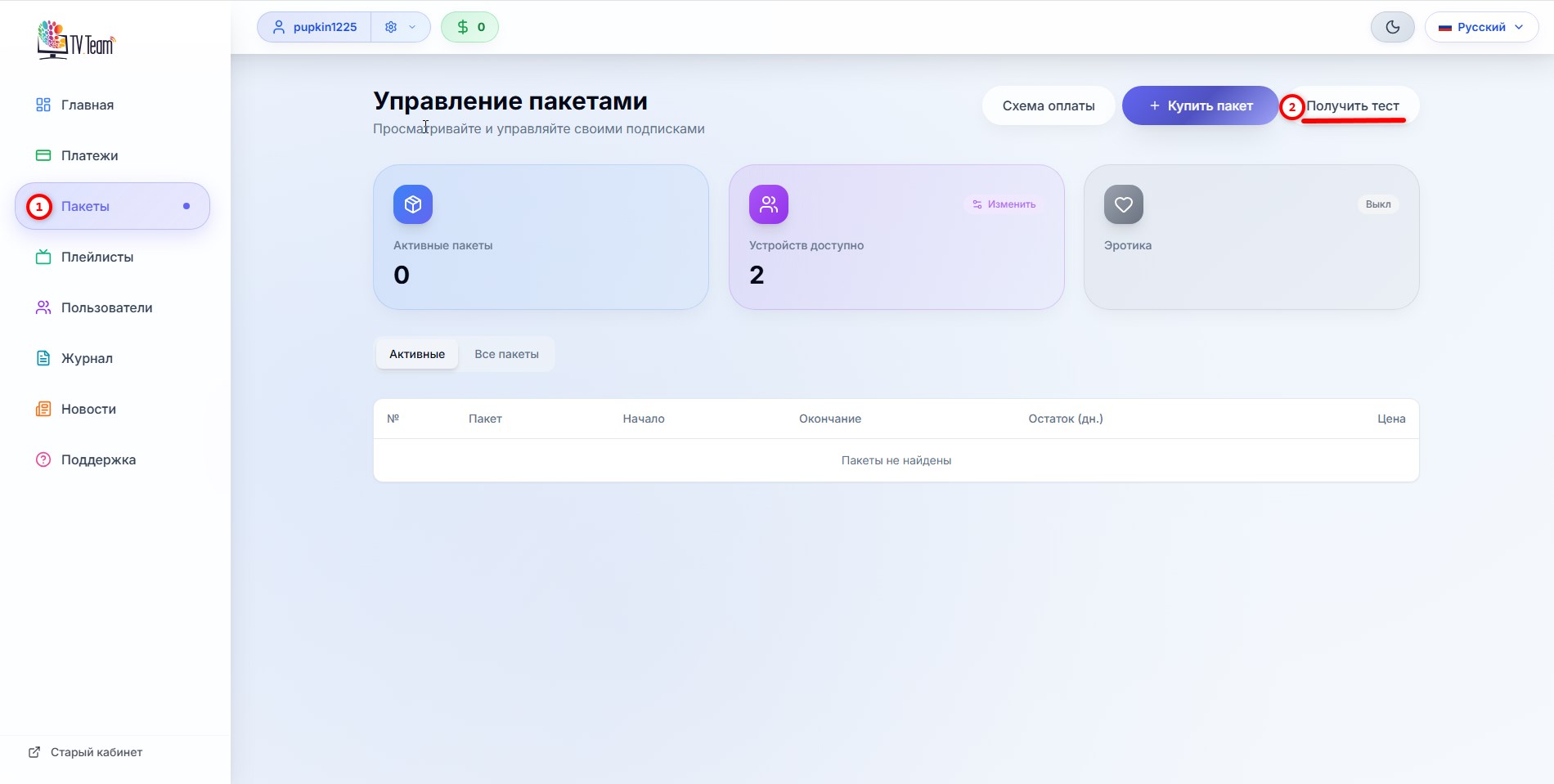
- In your personal account in the Packages section, click the Get Test button;
- Through the speed test of your internet to our servers, select the optimal server.
After registration, go to your personal account, navigate to the Packages(1) section and click the Get Test button(2)
The Get Test button will change to the message You already have an active test(3) and in your package list, you will see the package VIP - All Channels(4) valid for 3 days
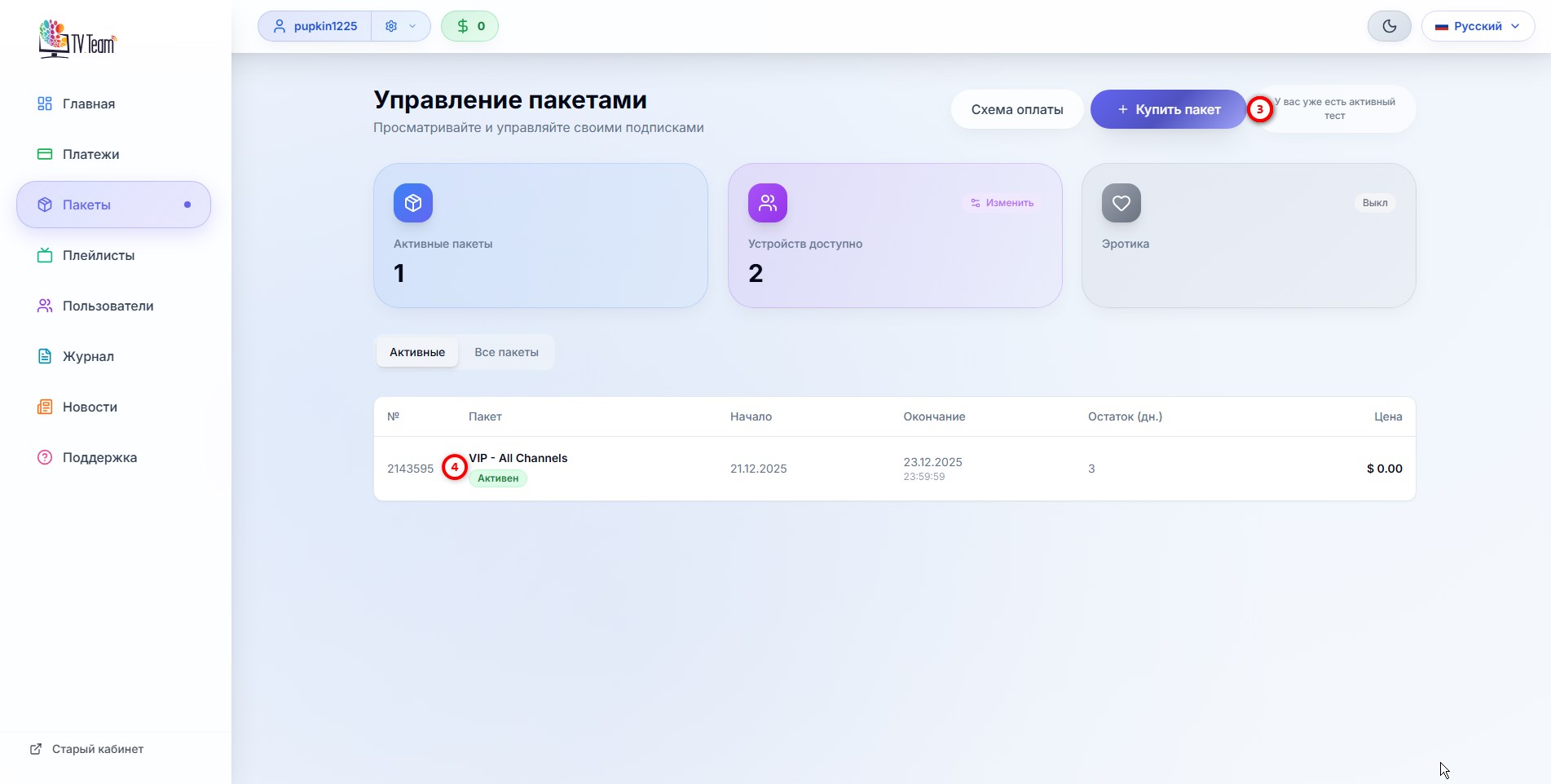
The test is issued for 3 calendar days, not to be confused with 24 hours, exactly 3 calendar days, and if you took the test at 23:00 (Moscow time), then one hour of that day is also counted as one of the calendar days of the issued test, i.e., in this example the test will last two full days and 1 hour. Keep this in mind.
The test package is no different from a package purchased for money. If after the test period you decide to continue watching, even if it is not the VIP - All Channels package, you do not need to change anything in the player, just buy a package and update the playlist in the player.
It's better to buy a package in advance since you don't have to buy a package only when the current one expires to avoid interruptions in viewing. Buy the package in advance – a day before, three days before, a week before, etc. If you buy the same package, the start date of the package will automatically be set to the day after the current package expires, and the package duration will be automatically set to 1 month. If you buy a different package, you need to set the start date of the package yourself (since the start date will automatically be the day of purchase) and accordingly set the package duration yourself, for which there are buttons for 1 month, 3 months, 6 months, and 12 months.
It is more profitable to buy packages for 3, 6, or 12 months, as additional discounts of 2.5%, 5%, and 10% respectively apply.
Instructions for purchasing or renewing packages: 2.5 How to top up your balance? How to buy a new package or renew an existing package (subscription)?
For testing, you are given a VIP package, so if you continue to buy a different package, then after the test package expires you need to update the playlist in the player.
You can read where to find the playlist in your personal account in the instruction 6.1 Where to get a playlist? Where to get a playlist link?
If you do not have the Get Test button (or it is there but inactive), then either you have already used our services (possibly under another login), or you selected the pay-per-time payment scheme, which is equivalent to having a package. Unfortunately, you will not be able to get a free test. A free package is only issued automatically!
Dealers also cannot get a test for their clients, but you can buy any package for them for 1-2 days.
After you have received the test package, you need to select the optimal server through the speed test of your internet to our servers, but the test must be done following the instructions, you do it for yourself, not for us:
a) you need to do the test from the viewing device, whether it is a TV or set-top box, i.e., from the device on which you have the player installed, entering the link below in the device’s browser;
b) you need to do the test when you have viewing issues.
Check access to our servers at the link: http://speed.tv.in/
restart the router by powering it off and on, wait for it to fully load, open the link page, perform a speed measurement with the "All Servers" button to all servers and share the table with results in the chat or choose the server yourself following the instructions 1.8 How to correctly choose your server?
If you watch on 2, 3, 4, etc. devices simultaneously, then viewing must be active on all of them while testing on the problematic device.
After changing the server in your personal account, do not forget to update the playlist in the player 6.3 How to update the playlist in the player?