ATTENTION!!! Registration is not required on any of the payment aggregators listed below to make a payment. All payments are made through your personal account by selecting the amount (in $$) and a payment aggregator.
I repeat, you do NOT need to register on the payment aggregator’s website!
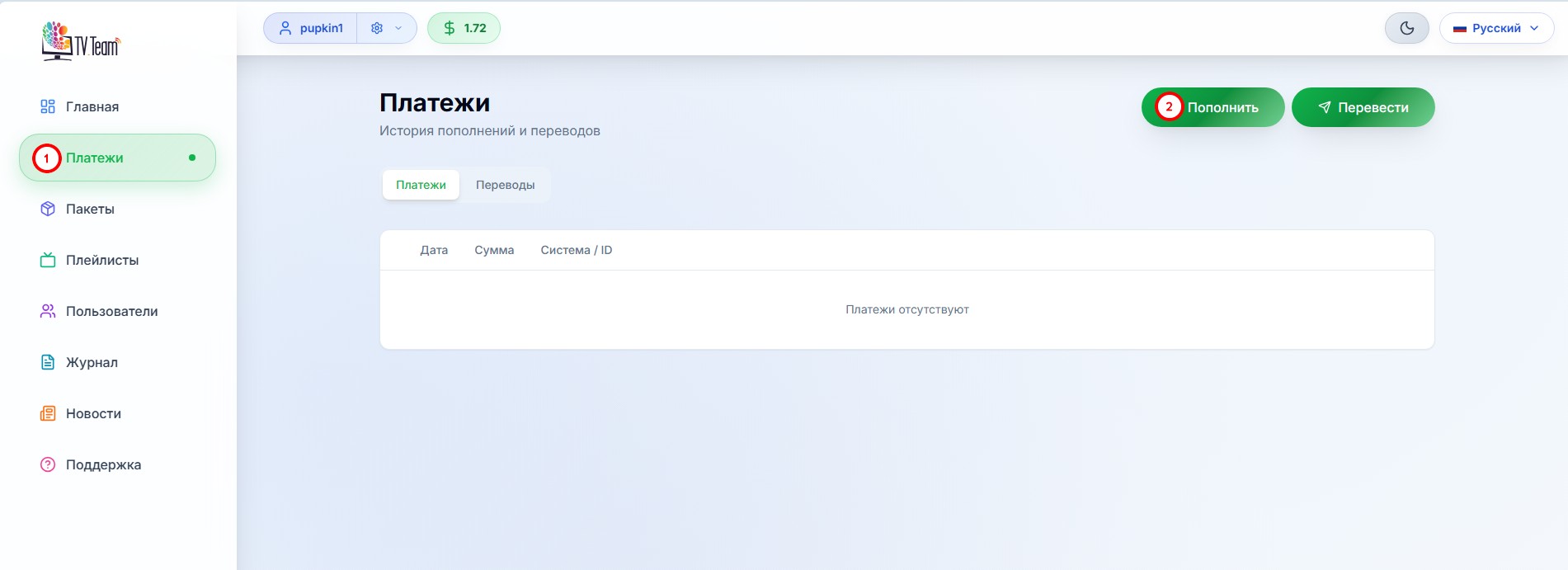
In your personal account, go to the Payments section(1) and click the Top Up button(2).
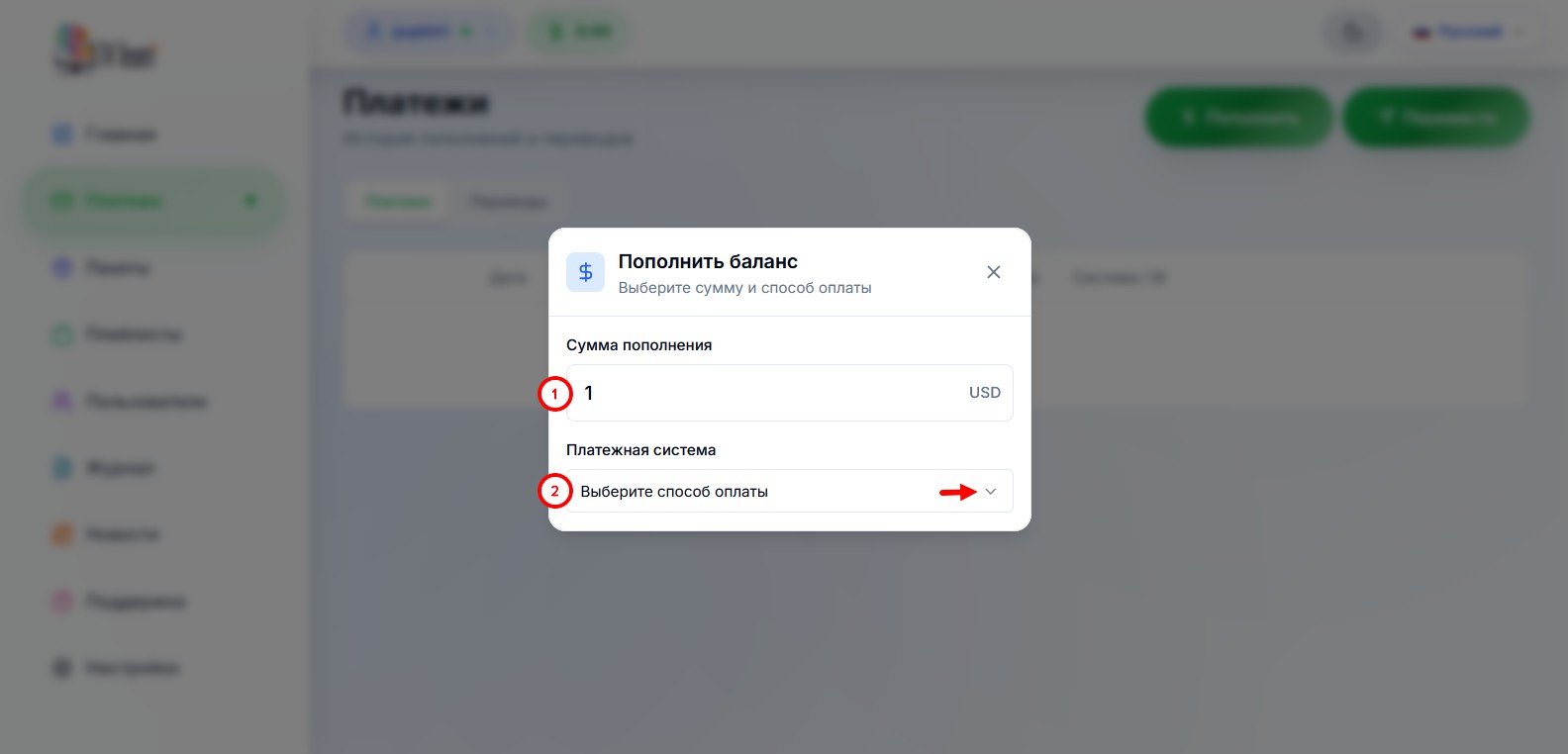
In the form that opens, enter the amount(1) and open the list of payment aggregators(2)
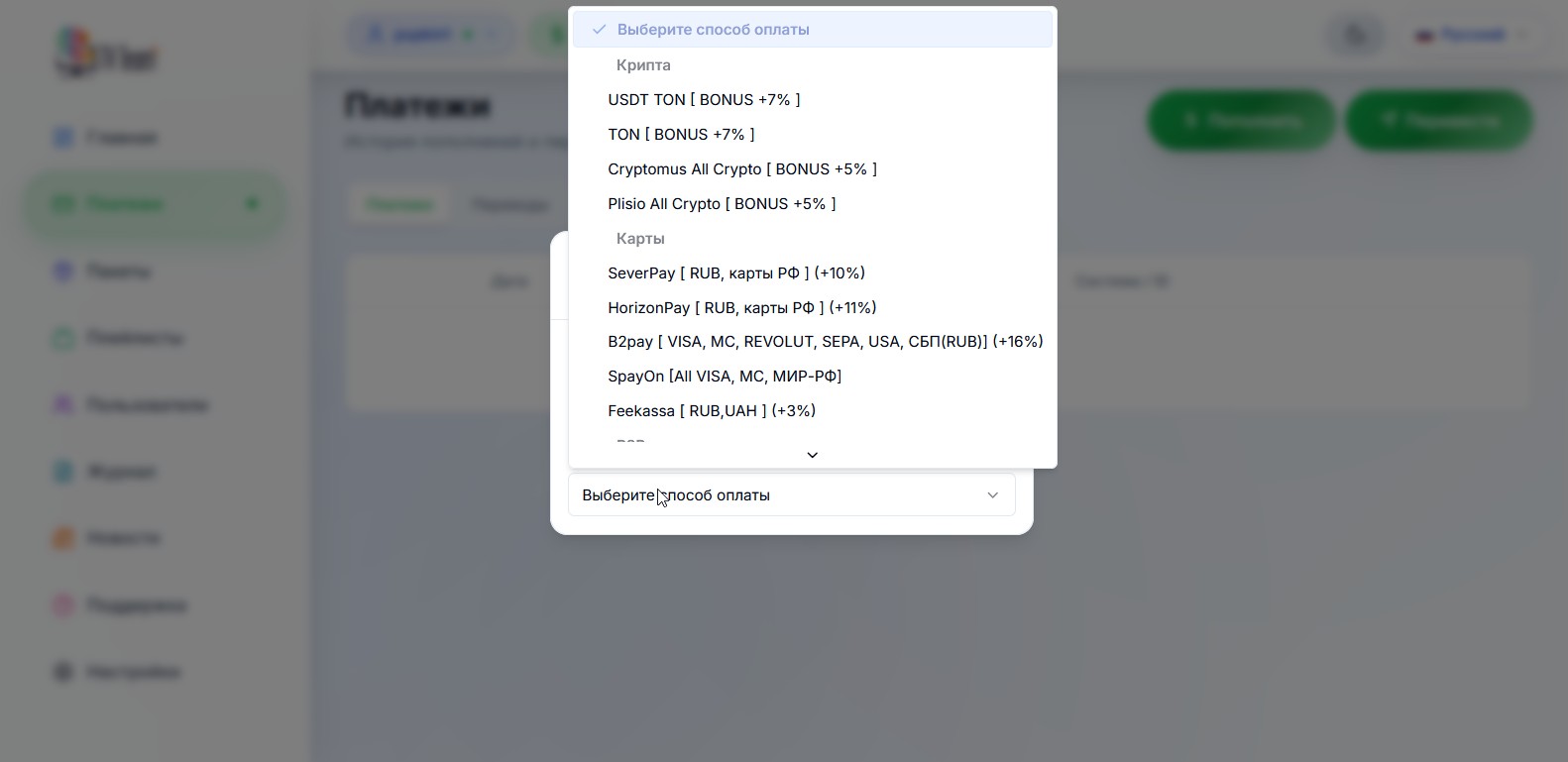
choose the payment aggregator through which you want to pay (below are lists of aggregators suitable for each country).
For example, the Pally SBP aggregator is selected.
If the amount you entered is less than the minimum allowed by the selected aggregator, you will see a window like this:
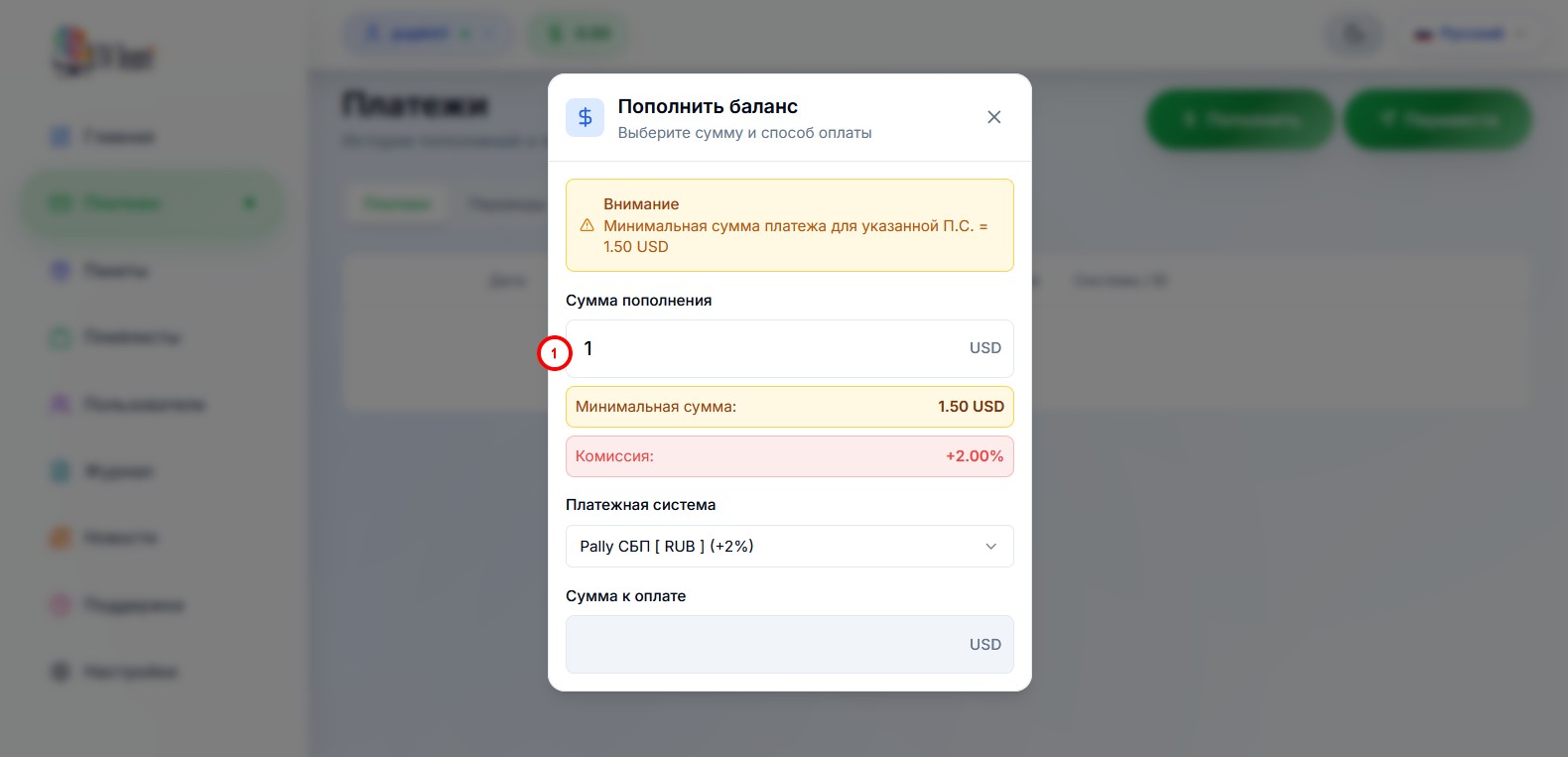
in this case, you need to increase the amount in the box (1).
If the amount is okay, a window like this will open:
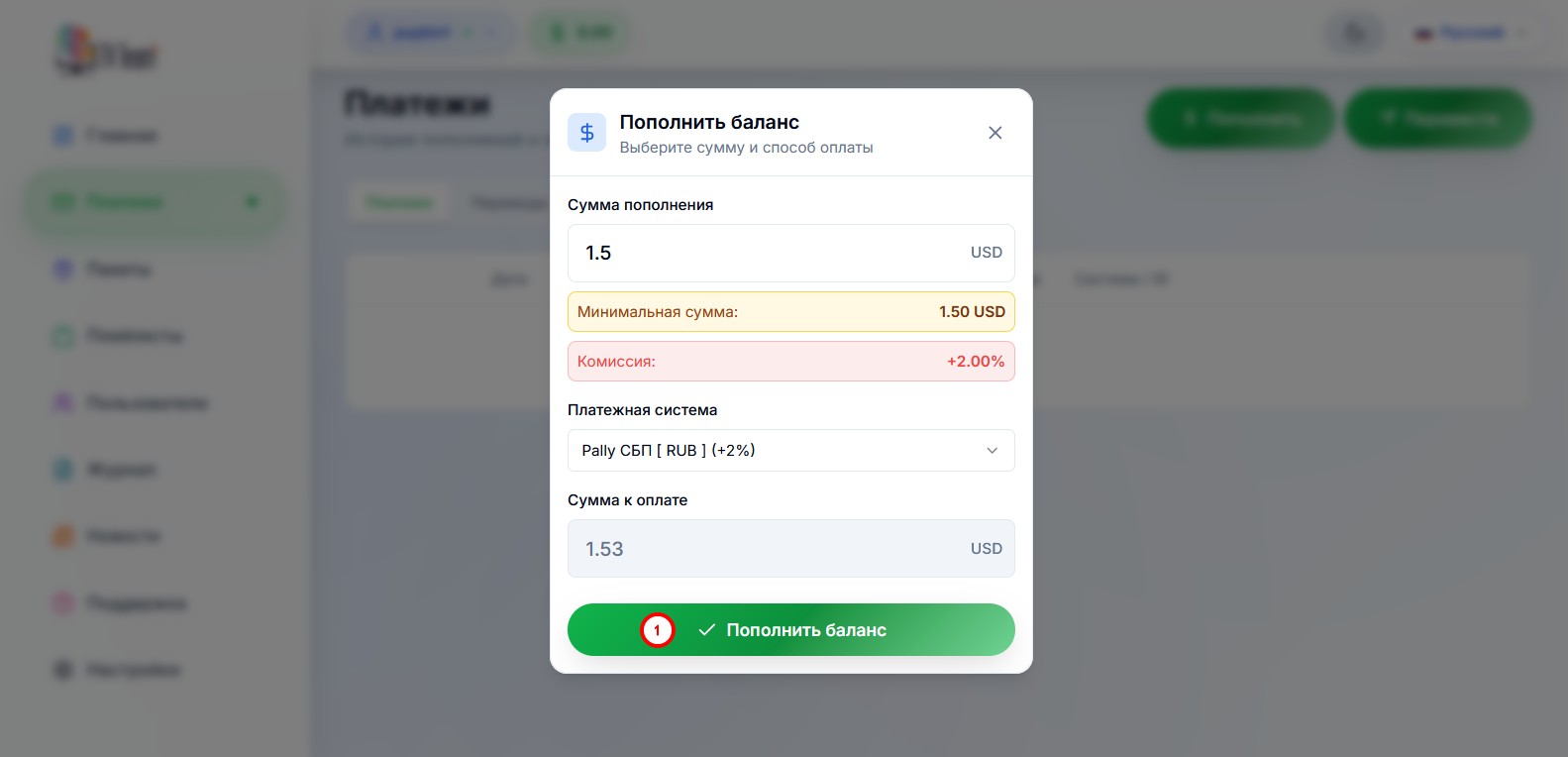
where you need to press the Top Up Balance button(1).
In the window that opens, you need to:
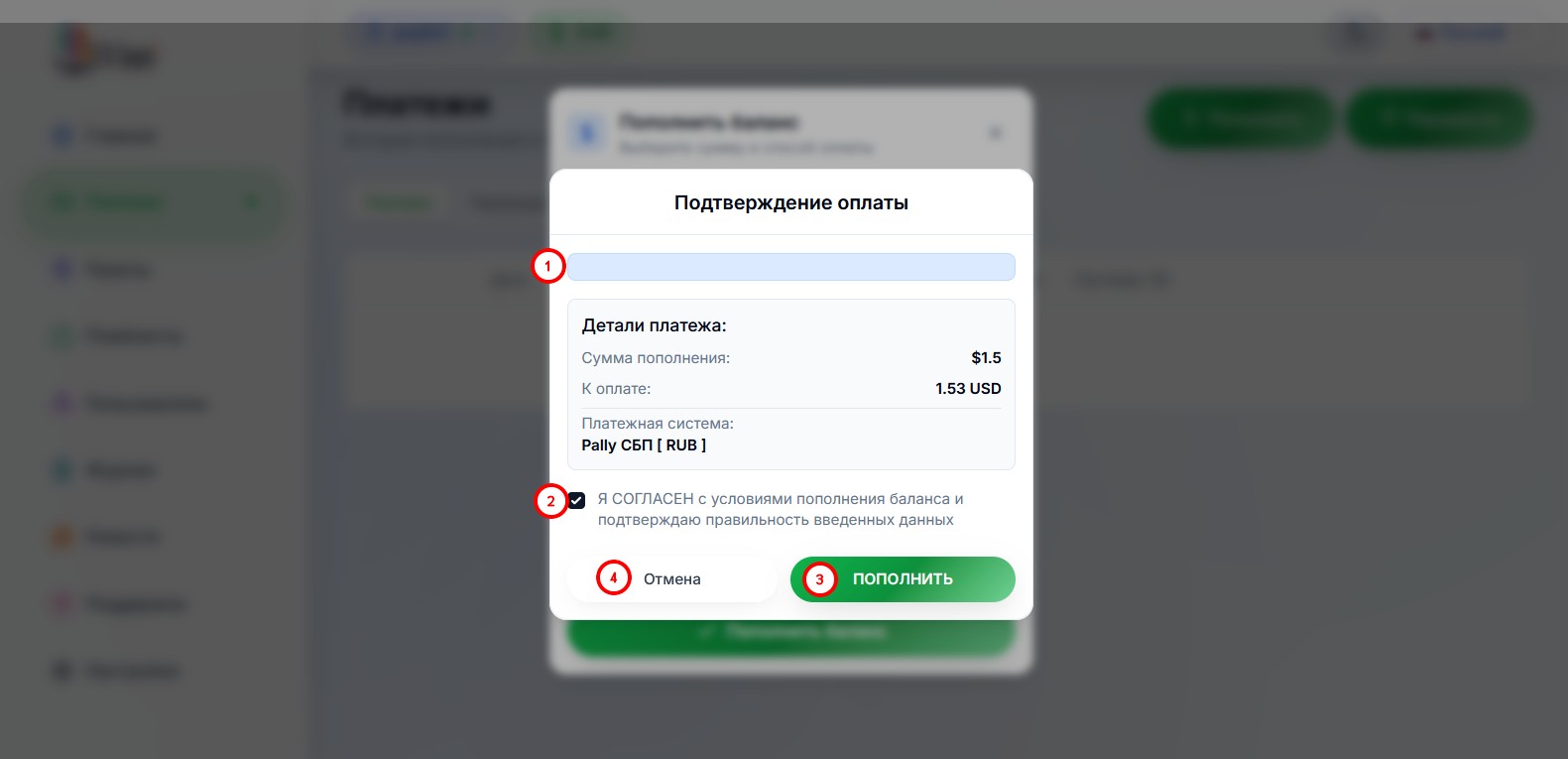
- read the terms for topping up your balance;
- check the box agreeing to the terms of topping up the balance and that the data entered is correct;
- if you agree with the terms, click the Top Up button;
- if you do not agree or entered/chose something incorrectly, click the Cancel button.
If you click the Top Up button, a payment form for the selected payment aggregator will open. Each aggregator has its own form; you need to fill in this form following the aggregator’s instructions (if available) and complete the payment.
¶ Payment aggregators options for different countries:
Europe / Russia / Belarus / Ukraine / Kazakhstan / Azerbaijan
Israel, Armenia, Georgia, Uzbekistan, Moldova (and many other countries)
¶ In Europe, the following payment aggregator options are available:
- By card through SpayOn (VISA MC), try several times in a row with breaks, E-mail address must be valid;
- By card through SeverPay (VISA MC Europa), try several times in a row with breaks, E-mail address must be valid
Attention! Payment is NOT accepted from countries listed as Syria, Yemen, Afghanistan, Belarus, Central African Republic, Cuba, Haiti, Iraq, Crimea, Sudan, Democratic Republic of the Congo, Iran, Mali, Myanmar, South Sudan, Venezuela, Russia, Somalia, Zimbabwe, North Korea, Cuba, Ukraine, Azerbaijan, Kazakhstan, Turkey, USA, Japan; - Cryptocurrency via TON or USDT TON - 8% discount on payment
via @Wallet bot;
alternate instruction;
via TON keeper; - Cryptocurrency via Plisio - 6% discount on payment;
- Cryptocurrency via Trybit All Crypto - 6% discount on payment, large selection of currencies;
- To pay via PayPal and more, send a private message to one of our partners in our chat:
@goldberg:matrix.tv.team (ask him about amounts and options);
@root24:matrix.tv.team (PayPal only for Eurozone citizens, from 50 euros), can also be messaged on Telegram for @root24 (Support); - To pay with an electronic OZON gift certificate, send a private message to one of our partners in our chat:
@ozon:matrix.tv.team (special manual method; OZON does NOT need to be in your country, you don’t need to do anything with the purchased certificate, just buy an electronic certificate or get it another way and send the activation code to the partner).
¶ In Russia, the following payment aggregator options are available:
- StreamPay via P2P and SBP QR from $5;
- MIR card via Lion tech MIR;
- MIR card via SeverPay;
- SBP via 1Payment SBP (lowest commission among all SBP);
- SBP via ParityPay (one of the lowest commissions among all SBP);
- SBP via Pally SBP (one of the lowest commissions among all SBP);
- SBP via AuraPay (minimum payment $1);
- SBP via WATA SBP;
- via AnyPay (cards from $13 / SBP from $2);
- Cryptocurrency via TON or USDT TON - 8% discount on payment
via @Wallet bot;
alternate instruction;
via TON keeper; - Cryptocurrency via Plisio - 6% discount on payment;
- Cryptocurrency via Trybit All Crypto - 6% discount on payment, large selection of currencies;
- To pay with an electronic OZON gift certificate, send a private message to one of our partners in our chat:
@ozon:matrix.tv.team (special manual method; OZON does NOT need to be in your country, you don’t need to do anything with the purchased certificate, just buy an electronic certificate or get it another way and send the activation code to the partner).
¶ In Belarus, the following payment aggregator options are available:
- via StreamPay from $5;
- Cryptocurrency via TON or USDT TON - 8% discount on payment
via @Wallet bot;
alternate instruction;
via TON keeper; - Cryptocurrency via Plisio - 6% discount on payment;
- Cryptocurrency via Trybit All Crypto - 6% discount on payment, large selection of currencies;
- To pay with an electronic OZON gift certificate, send a private message to one of our partners in our chat:
@ozon:matrix.tv.team (special manual method; OZON does NOT need to be in your country, you don’t need to do anything with the purchased certificate, just buy an electronic certificate or get it another way and send the activation code to the partner); in Belarus the certificate is easily bought by changing the delivery address to any Russian one.
¶ In Ukraine, the following payment aggregator options are available:
- By card through AnyPay from $10 (if the amount is too low and the payment form doesn’t open, try increasing it);
- via StreamPay from $10 (if the amount is too low and the payment form doesn’t open, try increasing it);
- Cryptocurrency via TON or USDT TON - 8% discount on payment
via @Wallet bot;
alternate instruction;
via TON keeper; - Cryptocurrency via Plisio - 6% discount on payment;
- Cryptocurrency via Trybit All Crypto - 6% discount on payment, large selection of currencies;
- To pay in hryvnia, send a private message to one of the users in our chat:
@goldberg:matrix.tv.team (ask him about amounts and options).
¶ In Kazakhstan, the following payment aggregator options are available:
- via StreamPay from $5;
- Cryptocurrency via TON or USDT TON - 8% discount on payment
via @Wallet bot;
alternate instruction;
via TON keeper; - Cryptocurrency via Plisio - 6% discount on payment;
- Cryptocurrency via Trybit All Crypto - 6% discount on payment, large selection of currencies;
- To pay, send a private message to one of our partners in our chat:
@goldberg:matrix.tv.team (ask him about amounts and options); - To pay with an electronic OZON gift certificate, send a private message to one of our partners in our chat:
@ozon:matrix.tv.team (special manual method; OZON does NOT need to be in your country, you don’t need to do anything with the purchased certificate, just buy an electronic certificate or get it another way and send the activation code to the partner).
¶ In Azerbaijan, the following payment aggregator options are available:
- By card through AnyPay from $18;
- via StreamPay from $5 – may have interruptions, this method is unstable;
- Cryptocurrency via TON or USDT TON - 8% discount on payment
via @Wallet bot;
alternate instruction;
via TON keeper; - Cryptocurrency via Plisio - 6% discount on payment;
- Cryptocurrency via Trybit All Crypto - 6% discount on payment, large selection of currencies;
- To pay, send a private message to one of our partners in our chat:
@goldberg:matrix.tv.team (ask him about amounts and options); - To pay with an electronic OZON gift certificate, send a private message to one of our partners in our chat:
@ozon:matrix.tv.team (special manual method; OZON does NOT need to be in your country, you don’t need to do anything with the purchased certificate, just buy an electronic certificate or get it another way and send the activation code to the partner).
Download the UniBank app from Play Market, register and activate a Digital Card, must be MasterCard, card is issued and activated immediately for free, you can pay through b2pay;
Call your VTB bank and check if they issue MIR cards, if yes, you can get a real or virtual card and pay through SeverPay;
ABB Bank – MasterCards are issued free, payment goes through b2pay, card is issued the same day without waiting.
¶ In Israel, Armenia, Georgia, Uzbekistan, Moldova (and many other countries), the following payment aggregator options are available:
- By card through SpayOn (VISA MC), try several times in a row with breaks, E-mail address must be valid (except USA, Azerbaijan, Belarus, Ukraine, Kazakhstan, Japan);
- By card through SeverPay (VISA MC Europa), try several times in a row with breaks, E-mail address must be valid
Attention! Payment is NOT accepted from countries listed as Syria, Yemen, Afghanistan, Belarus, Central African Republic, Cuba, Haiti, Iraq, Crimea, Sudan, Democratic Republic of the Congo, Iran, Mali, Myanmar, South Sudan, Venezuela, Russia, Somalia, Zimbabwe, North Korea, Cuba, Ukraine, Azerbaijan, Kazakhstan, Turkey, USA, Japan; - By card through AnyPay, only for Armenia, Uzbekistan, Kyrgyzstan and Tajikistan (AMD - from $3 / UZS - from $3 / KGS - from $11 / TJS - from $10);
- Cryptocurrency via TON or USDT TON - 8% discount on payment
via @Wallet bot;
alternate instruction;
via TON keeper; - Cryptocurrency via Plisio - 6% discount on payment;
- Cryptocurrency via Trybit All Crypto - 6% discount on payment, large selection of currencies;
- To pay, send a private message to one of our partners in our chat:
@goldberg:matrix.tv.team (ask him about amounts and options); - To pay with an electronic OZON gift certificate, send a private message to one of our partners in our chat:
@ozon:matrix.tv.team (special manual method; OZON does NOT need to be in your country, you don’t need to do anything with the purchased certificate, just buy an electronic certificate or get it another way and send the activation code to the partner).
¶ Attention!
If you do not see one of the payment aggregators listed in the instructions among those offered in your personal account, it means that this aggregator has some issues, temporary or permanent.
If temporary, it will reappear after some time; if permanent, we will update the instructions.