¶ Watching IPTV playlists on any Samsung or LG smart TV using the Media Station X (MSX) application.
¶ Description
Here's a very simple way to set up IPTV playlists on virtually any Samsung smart television using the Orsay and Tizen platforms, or on LG using the NetCast and WebOS platforms. All you need to do is install and use the Media Station X application.
¶ Step-by-step Instruction
¶ Steps 1-3: Installing MSX
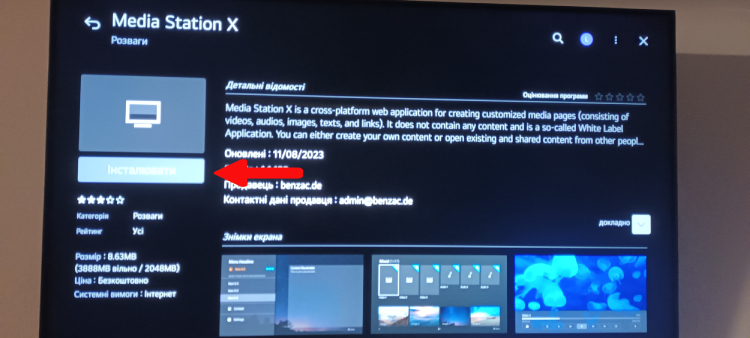
- Launch Samsung Apps or LG Content Store;
- In the search bar, enter "Media Station X" and press "OK";
- Open the application card and start the installation.
¶ Steps 4-6: Configuration
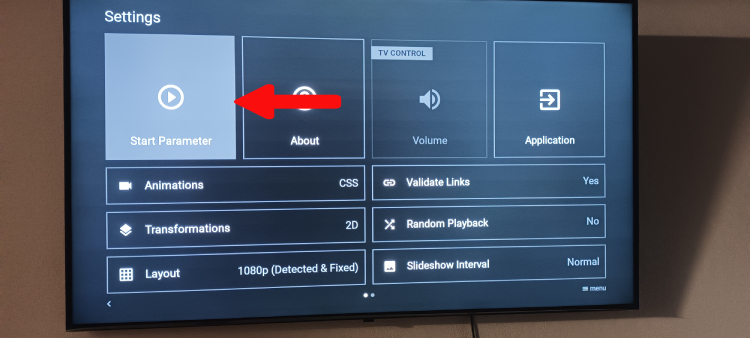
4. After installation, find and launch Media Station X on your TV;
5. Select "Settings" to configure Media Station X;
6. In the settings menu, go to "Start Parameter".
¶ Step 7: Setup
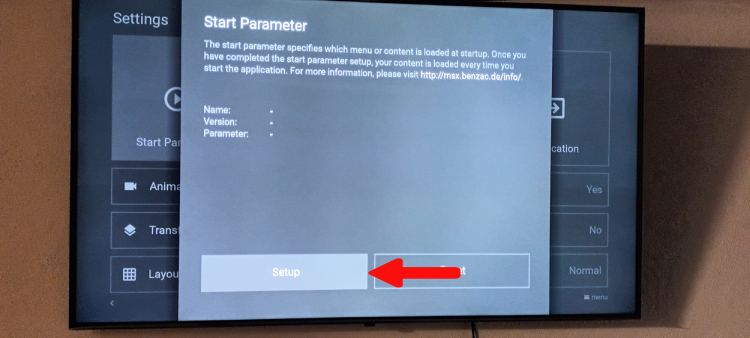
7. You see that the current parameters are empty. Select "Setup".
¶ Step 8: Entering Parameter ⭐
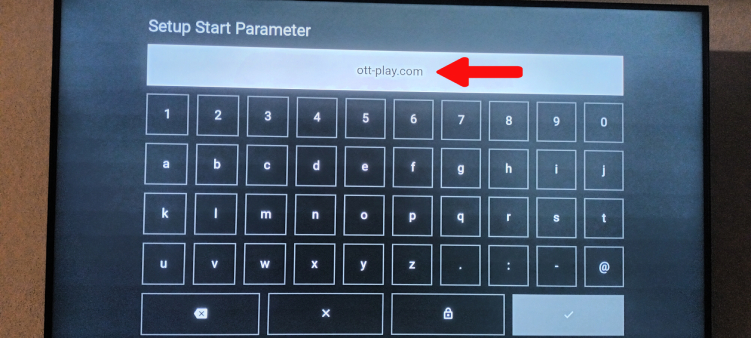
8. In the opened menu, enter the portal address ottp.eu.org (or drm-play.com, or ott-play.com) and save the settings.
ottp.eu.org - OTT-play FOSS
drm-play.com - drm-play (or OTT-play DRM)
ott-play.com - Ott-play (by Alex), blocks Russian channels and servers. If you need these channels, use the portal addresses mentioned above.
¶ Step 9: Disabling Validation ⭐
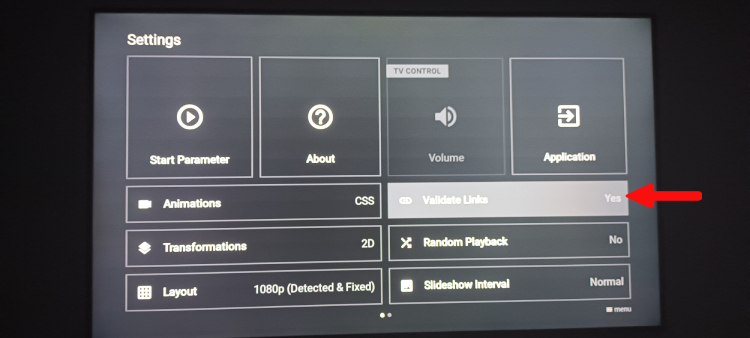
9. Go to "Settings", select "Validate Links" and choose "No". This is necessary so that upon launching Media Station X, the ott-play application starts without any additional confirmation.
¶ Step 10: Playlist Setup
Now on your TV, the application (player) Ott-play will start through Media Station X and you can proceed to setting up the player using the instructions.
Enjoy your viewing!
¶ Remote Control Button Functions
¶ Basic Functions:
- [Q.VIEW] - Return to previous channel (webOS only)
- [INFO] - Invoke information of the current transmission (cyclic press: show title - show description - remove)
- [LIVE MENU] - Invoke settings menu (webOS only)
- [OK] - Invoke channels' selection list
- [RETURN] - Remove info from the screen / close any menu
- [EXIT] - Exit
- [A] - Invoke list of programs and channel archives (archives are highlighted in red)
- [B] - Invoke list of channel archive records - no repeats and in alphabetical order (convenient for movie channels)
- [C] - Invoke settings menu
- [D] - Select channel category
¶ In Live Viewing Mode:
- [1]...[0] - Select channel by number
- [Play/Pause] or [0] - Pause/playback (if channel archive available)
- [Rew] - Timeshift: return one minute back (if channel archive available)
- [Stop] - Stream restart
¶ In Archive Viewing Mode:
- [Play/Pause] or [0] - Pause/playback
- [Stop] - Stop playback and return to live transmission
- [8] - Stop playback and return to live transmission
- [2] - To the beginning of the transmission/previous transmission
- [5] - To the next transmission
- [Rew]/[Fwd] - Backward/Forward by 1 minute
- [1]/[3] - Backward/Forward by 15 seconds
- [4]/[6] - Backward/Forward by 3 minutes
- [7]/[9] - Backward/Forward by 10 minutes
- [Up]/[Down] - Invoke the rewind dialog with a ±1 minute step and transition confirmation